In the paper we submitted to IEEE ANTS 2026, I wrote that our INT8 model runs "in under 16 ms on a single CPU thread". It doesn't. On one thread it takes about 96 ms. The 16 ms figure was a real measurement, but ONNX Runtime was using one thread per physical core when it was taken, and I didn't know that when I wrote the sentence.
The paper was accepted and I found this while preparing the camera-ready version, so the published paper has the correct number. I'm writing it up because it's an easy mistake to make if you benchmark PyTorch and ONNX Runtime in the same script, which is exactly what I did.
Some context
LightDep is a small model for depression screening. It's meant as a screening aid, not a diagnosis. It looks at face landmarks and audio features from a short clip, and the point of the project is that it runs on the user's own device. So after knowledge distillation I exported it to ONNX and quantized it to INT8, which brings it down to a 3.96 MB file. Every latency number below is batch size 1 with 512 input frames, on CPU.
How it came up
It didn't start with threads. One of the reviewers noticed that the same PyTorch model showed 129.32 ms in one table and 195.60 ms in another. That one had a simple explanation: the two numbers came from two different measurement sessions. The fix was to measure everything again in a single run, so I started writing a new script for that.
While doing that, I opened the original benchmark to reuse its timing code and noticed this (simplified):
import torch
import onnxruntime as ort

torch.set_num_threads(1)   # single-thread = phone-like

# ... time the PyTorch model ...

sess = ort.InferenceSession("student_int8.onnx",
                            providers=["CPUExecutionProvider"])
# ... time sess.run(...) ...
torch.set_num_threads(1) works, but only for PyTorch. ONNX Runtime is a separate C++ library with its own thread pool, and it doesn't read PyTorch's settings. It takes thread settings only from the SessionOptions you pass when you create a session. I created both sessions (FP32 and INT8) without any options, so ONNX Runtime used its default, which is one thread per physical core.
So the PyTorch rows in my table were single-threaded and the ONNX rows weren't, and the whole table said "single-thread". The script even wrote "single-thread CPU" into its output file. I had typed that string myself, and nothing in the code checked it.
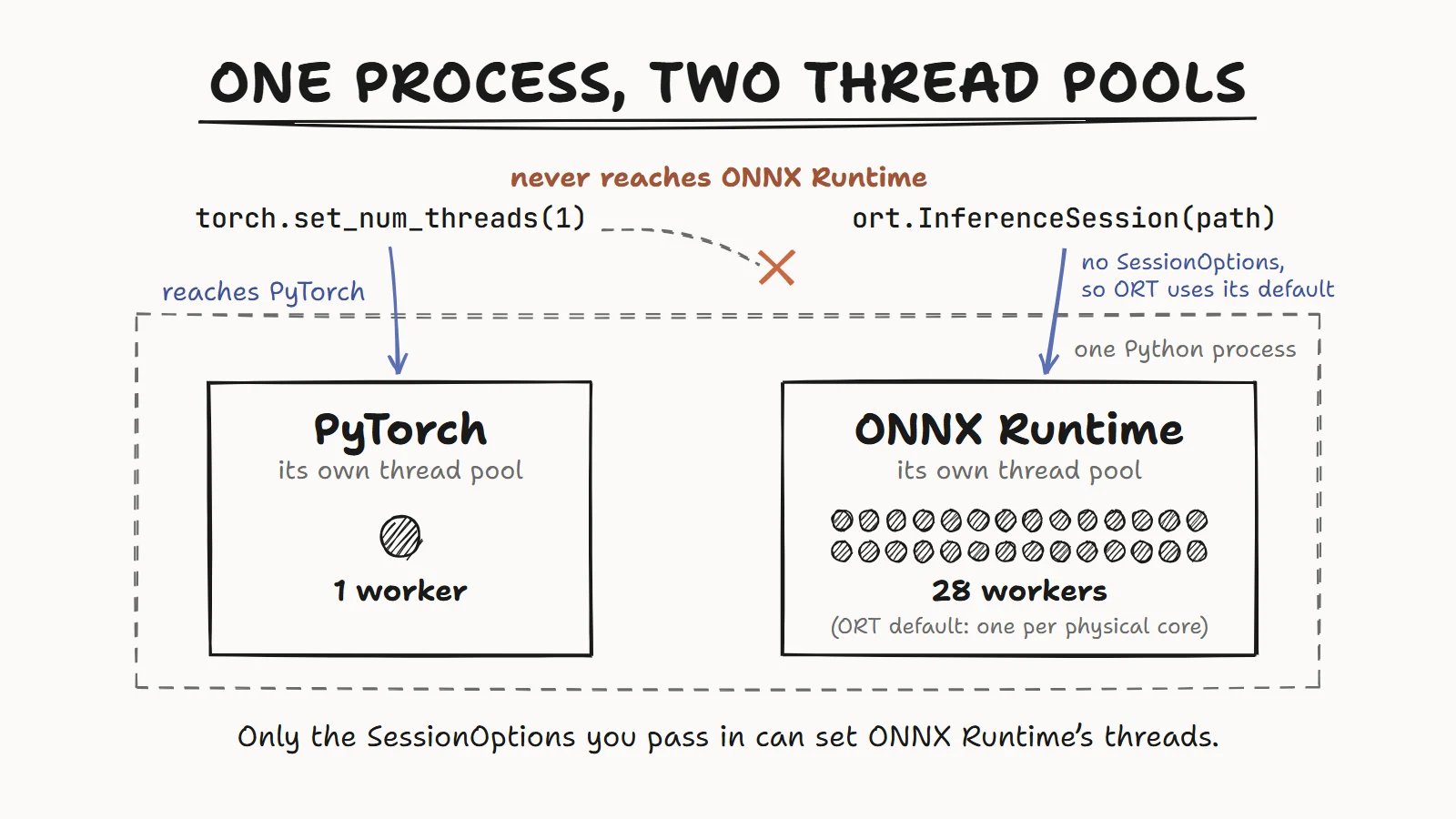
The fix is a SessionOptions object:
so = ort.SessionOptions()
so.intra_op_num_threads = 1   # threads that split one op, like a single MatMul
so.inter_op_num_threads = 1   # threads that run separate ops side by side
sess = ort.InferenceSession("student_int8.onnx", so,
                            providers=["CPUExecutionProvider"])
intra_op_num_threads is the one that matters here, because most of the time goes into big matrix multiplications and this controls how many threads share each one. inter_op_num_threads only does anything in ONNX Runtime's parallel execution mode, which I wasn't using. I set it anyway so the intent is obvious to whoever reads the script next.
Re-measuring
I ran the new script on a lightly loaded lab workstation: an Intel Xeon w7-3465X (28 physical cores, 56 logical), load average about 3 at the start, with torch 2.14 (CPU build) and onnxruntime 1.30. Batch 1, T=512, 5 warm-up runs, then the mean of 100 timed runs. That's repeated for 3 rounds and I report the median round.
I timed ONNX Runtime twice in the same process: once pinned to one thread, and once with empty SessionOptions, which is what the old script effectively did. Same model file, same inputs, same machine. I wanted the thread setting to be the only thing that differed, so any gap could only come from it.
| Variant | Size | Old paper | Rerun, 1 thread | Rerun, ORT default threads |
|---|---|---|---|---|
| PyTorch FP32 | 14.71 MB | 195.60 ms | 353.39 ms | not measured |
| ONNX FP32 | 14.82 MB | 18.68 ms | 157.76 ms | 22.73 ms |
| ONNX INT8 | 3.96 MB | 15.57 ms | 96.04 ms | 8.90 ms |
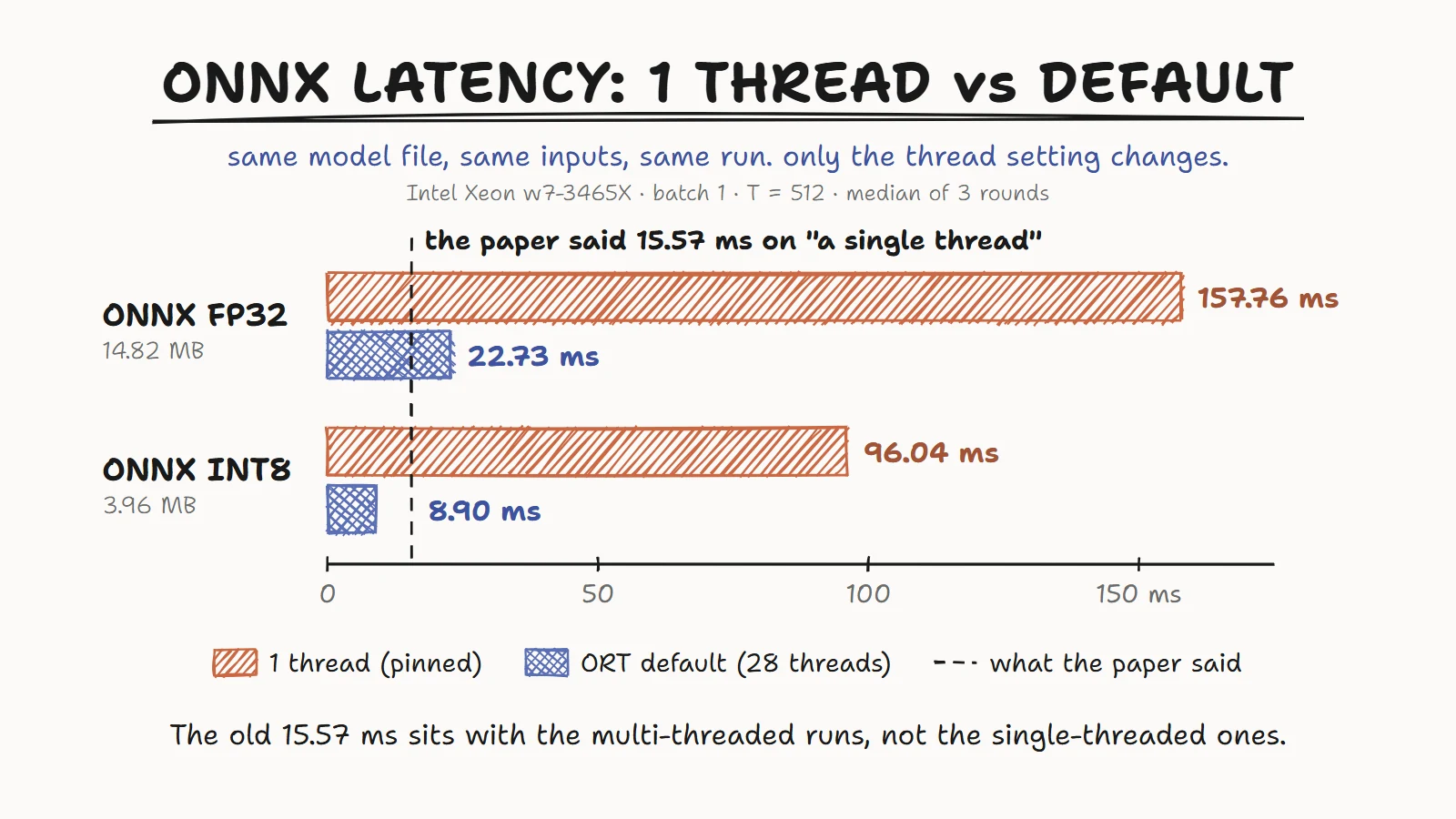
The old column comes from an earlier session, so I wouldn't compare it number for number with the other two. But 15.57 ms is obviously in the multi-threaded range, not anywhere near 96. The ONNX output matches PyTorch to a maximum absolute difference of 2.68e-7, so it's the same model in both cases.
The same run took care of the reviewer's question too. In one session, the two tables give 331.57 ms and 353.39 ms for the same model, well within the round-to-round spread (279.98 to 399.12 ms).
Looking back, there were hints. In the old table, ONNX FP32 was about 10x faster than PyTorch FP32 (18.68 vs 195.60 ms) for the same FP32 math. Pinned to one thread, the gap is about 2.2x (157.76 vs 353.39 ms). And my browser demo, which runs the same INT8 file through onnxruntime-web and does set ort.env.wasm.numThreads = 1, measured 216.8 ms on a Core i5-12450H laptop in Chrome. That's roughly 14x the "single-thread" native number. I assumed the browser was just slow. WASM is often a few times slower than native code, but 14x is a lot, and next to 96.04 ms it comes out at about 2.3x, which is much easier to believe. It's a different machine, so it was never a clean comparison, but it was enough to make me look harder, and I didn't.
Which number goes in the paper
96 ms. LightDep is meant for phones, and a phone has a few fast cores and several slow ones. The model also shares the CPU with face tracking, audio processing and the UI. One thread is the number that means roughly the same thing on any device, while "default threads" mostly tells you how many cores my test machine had. Even 96 ms isn't a phone number, since one Xeon core is faster than one phone core, but it's a fair comparison. The paper now says 96 ms.
I still think the 8.9 ms number is worth stating, as long as the thread count is right next to it. It shows the model parallelizes well (about 10.8x going from one thread to ONNX Runtime's default of 28 on this CPU), it's the realistic figure if someone runs it on a desktop or server, and it shows where the old number came from. The old number wasn't made up. It was a multi-threaded measurement with the wrong label.
Two export errors along the way
Neither of these changes any number, but both stopped the rerun script from working at first.
The transformer fast path. Under torch.no_grad(), an eval-mode nn.TransformerEncoderLayer skips its normal step-by-step ops and runs one fused kernel, aten::_transformer_encoder_layer_fwd. That's faster in PyTorch, but the ONNX exporter has no translation for it, so the export fails. My old script exported fine by luck: the export call happened to sit outside any no_grad block. The new script wraps all of main() in @torch.no_grad() for timing, which turned the fast path on. The fix is to switch gradients back on just for the export.
The dynamo exporter. Newer PyTorch makes torch.onnx.export use the dynamo-based exporter by default, and that one needs the onnxscript package. I passed dynamo=False to stay on the TorchScript exporter. I could have installed onnxscript instead, but the deployed model was exported with TorchScript, and changing the exporter in the same rerun would have meant two things changing at once.
Both fixes together (simplified):
with torch.enable_grad():   # keeps transformer layers off the fused fast path
    torch.onnx.export(model, inputs, "student.onnx",
                      dynamo=False,   # stay on the TorchScript exporter
                      opset_version=17)
What I check now
- Pin threads in every runtime separately:
torch.set_num_threadsfor PyTorch,SessionOptionsfor ONNX Runtime,ort.env.wasm.numThreadsin the browser. Each library has its own pool. - Write the thread count and CPU model next to every number, and note how busy the machine was.
- Measure everything that will be compared in one session, on one machine, changing one thing at a time.
- Do warm-up runs before timing, since the first few include memory allocation and cold caches.
- Repeat in rounds, take the median, and keep the per-round numbers so the spread is visible.
- Compare against another runtime, like the browser. If two numbers for the same model don't fit together, find out why before publishing.
The paper will be in the IEEE ANTS 2026 proceedings, and I'll add a link here once it's out. The LightDep code, results and browser demo are on GitHub: github.com/devansh101005/Depression_Detection_KD_Edge. If you spot anything wrong in this post, let me know.